 Purpose
 App
Architecture
App
Architecture CONSENT MODE
 Requirements
 AD BLOCKER
 Google
Analytics 4
Google
Analytics 4 Facebook/meta conversions API
 Google
Ads
Google
Ads TWITTER
 Hotjar
 klaviyo
.png) Linkedin
Linkedin.png) Pinterest
Pinterest  Outbrain
  Snapchat
 .png) Reddit
Reddit .png) Quora
Quora How to get a CSS Selector for GA4 Event Tracking
To track custom events in GA4, simply use browser tools to copy the CSS selector of any element on your website. This allows you to set up accurate click event tracking with ease.
- Go to the page where you want to track the events.
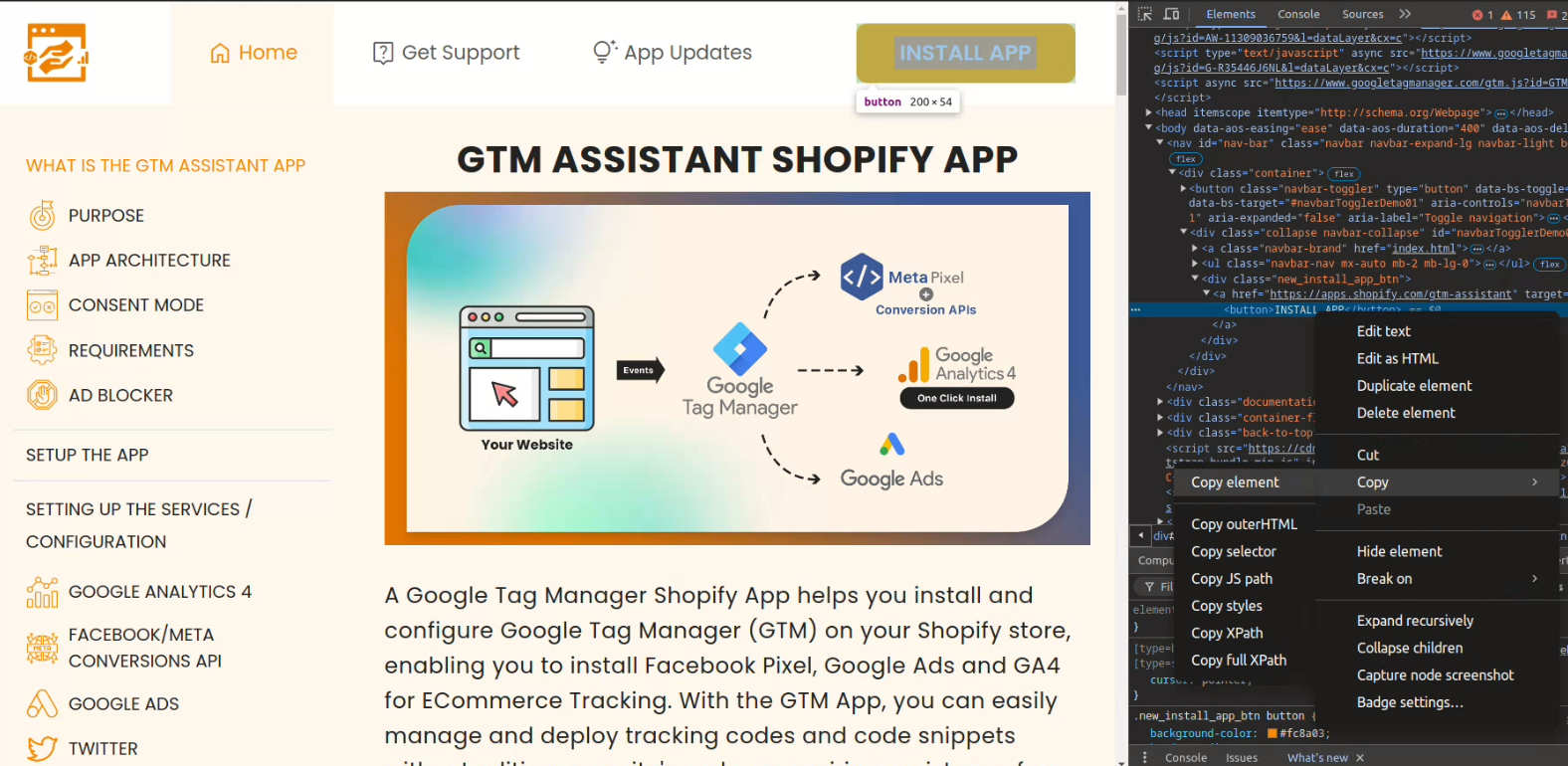
- Right-click on the button, link and select Inspect (or press Ctrl + Shift + I / Cmd + Option + I).
- In the Elements tab of Developer Tools, the HTML of the clicked element will be highlighted.
- Right-click the highlighted element and select Copy > Copy selector.
- If the selector is too specific or too generic, manually refine it by using unique attributes like id or class.
-
- Examples:
- ID-based: #submit-button
- Class-based: .nav-link